Friday, 5 June 2015

Multiplayer Map Design - Recent Changes

Since the completion of my blockout deathmatch map, I have been adding features in to improve the level in any way I can. These improvements include the importing of custom meshes and pre-existing materials inside UDK.

In particular I have added a flipbook texture to the map, along with the other particle effects in the form of flaming barrels, this had been left out originally as I could not find a use for it within my level. with subesquent thought I added flaming barrels, as they could in some way fit into the combat facility concept.

Physical strip lights, a pulsating light and a rotating holographic effect Splash Damage building have also been added, below are a variation of screen captures of changes made since blockout completion.


I have learned a lot through these two units and have thoroughly enjoyed working in-engine. as such I still have plans to add to this map, with more of my own meshes, replacing the UDK resources used, furthering this as a piece to be used in my portfolio.
I will also be working on improving textures as and where necessary, in an effort to make my map feel even more like an abandoned warehouse, converted into a combat training facility, in accordance with my original concept.

Thursday, 7 May 2015

Multiplayer Map Design - Peer Review stage 3

A third peer review stage has been reached within this project, I had to come up with another 3 questions to ask my peers and request feedback on each point, not only asking for simple answers but asking for any ways in which they think my map could be improved.
This is important to get a wider perspective opinion on my level, as always, what I feel fits the level perfectly may not fit as well in another users opinion, I will be evaluating all given feedback and editing my map in accordance with the given feedback.

The three questions and their subsequent answers given were as follows:

1. The upper floor of the level is surrounded by a post process volume, lowering the light overall from a higher point in the area. Do you feel the brightness change is too light, too dark or alright? Any other criticism appreciated.

AI think the post process volume add a great effect to the level but I do believe it needs to be brightened slightly.
B.The post process volume is pretty good but I think you should add bit bright make it easily visible.
C.  I think the lower lights helps create the atmosphere, but in terms of navigation it might need to be a little lighter. Then it’ll be perfect.

2.  Navigate to the Rocket Launcher, does the animated lighting in this instance feel well placed? The aim is to keep the rocket launcher shrouded enough whilst also enticing a player to approach the pickup.

A. The animating light helps the rocket launcher stand out and draws the player’s attention straight to it. I also with where the rocket launcher is placed is very convenient as it requires more players to fight it out to get to the weapon. 
B. I think Rocket launcher is good in a place and you should put more Rocket launchers in your level.
C. I think the lighting and placement is good, as the player has to make sure they don’t fall. So it feels like a good reward as a pickup. Maybe adding ammo for the rocket launcher on the top floor might be a good idea as they only have access to it??

3.  My lens flare is located on the firing range, do the values within the flare feel appropriate for a warning light within the lighting scheme for the level?

A.  I thing is an appropriate addition to the level but does change it in any way that impacts the game.
B. The Lens flare, I don't seem to notice any change when I get closer.
C.  I think the lens flare needs to be a little brighter or add some effect when further away, as it just looks like a normal red light from afar.


Building on my feedback from peers one change is clear, based on my first question I can see I need to slightly increase the brightness in my post-process volume, I will include this update in a changelog post.

From the second question I may add some Rocket ammo, dependent on whether or not every NPC can pick up the rockets, this would balance the gameplay more so as not only the player(s) wielding a rocket launcher can collect ammo.
Adding more rocket launchers may retain the games pacing, but may also affect it negatively, so I will experiment with this in due course.

From question 3 I may alter the lens flare attributes, although the intention was to only have the lens flare render in fully from a closer range, due to an artificial light not being as harsh on the eyes as a natural light like the sun or moon, this will also be experimented with and updated in a changelog..

Multiplayer Map Design - Simple Rotation

Moving into the more aesthetic area of map creation, prior to creating and importing my own meshes, materials and textures etc, I have the option of implementing some simplistic moving objects within my level, fans for example, to implement these is simple and they may fit in my level nicely.

To start I imported the fan from the "Old School" package within the UDK Content Browser into my scene, I then converted the mesh to a mover.


Once converted, F4 is used to open the attributes and the object can be simply animated from here, within the 'Movement' drop down list, the 'physics' option is changed to "PHYS_Rotating" and subsequently, values can be modified within the Rotation Rate section.


Using the Roll, Pitch and Yaw options I can modify any physical mesh to rotate accordingly, the degrees entered being the amount of degrees rotated through each second.

Multiplayer Map Design - Bink Videos

I have the option of adding video footage to my map in the form of a Bink video file (.bik extension), the software to convert to this format is freely accessible and easy to use, which should assist me in my level design if videos are necessary.
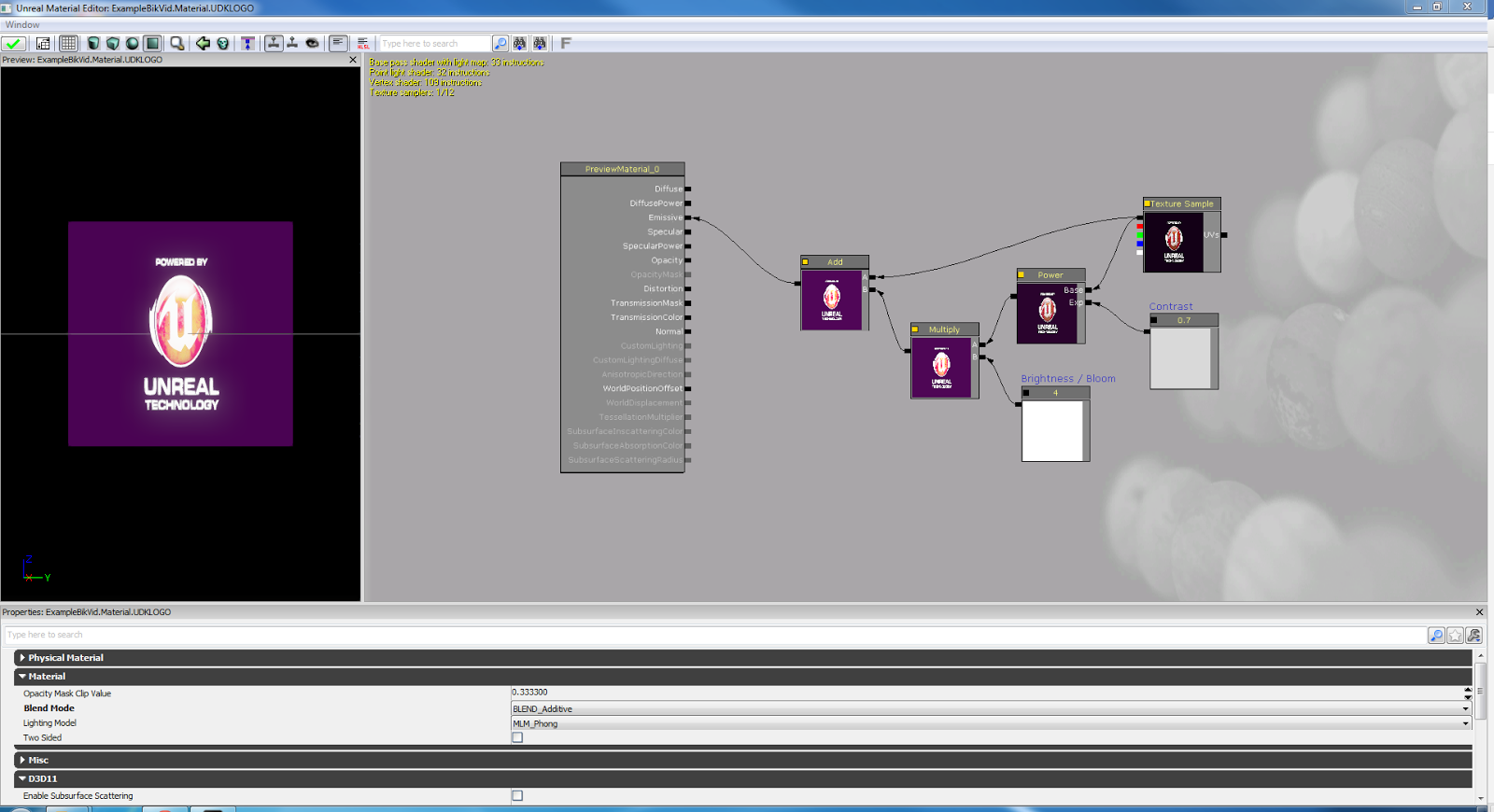
A material is set up with four main nodes present, the Texture sample itself, a power node, a multiply and an add node, these are linked together with other optional nodes as below.


To import my own video capture, a Bink video is imported through the Content Browser, grouped as a material in accordance with the other assets.
This can then replace the 'TextureSample' node in the material editor.


Certain elements can then be modified to change the appearance of the video in-engine, making use of opacity and other elements. The results can be seen below.


This may or may not be used within my level, but I have the knowledge to implement this regardless if I find a use for it, it could be implemented into a control panel or a television screen for example.

Multiplayer Map Design - Flickering/Pulsing Lights

Another mandatory feature to place within my level in this project is a flickering or pulsing light, these are usually faked in-engine using materials applied to lighting functions, lights themselves are not animated.


To animate my light, I have taken a sample and edited it to fit within my playable area, this is placed in such a manner to draw players into a firefight for the rocket launcher placed on the walkways above.

The material integrated into the light itself is comprised of multiple texture layers, panners and rotators, these each control a cloud texture sample which is ultimately applied to the light, panning between a black and white shade, giving the effect of a flickering light in-engine, but saving greatly on budgets and subsequently GPU and/or CPU strain.


I have control of multiple values within the rotators and panners, allowing me to speed up and slow down both panning and rotation. These are attached to the UVs of the Texture sample, control the pan and rotation values of the sample and in effect control the flicker rate of a light source, these can be edited accordingly to give any desired rate of flicker.
A standard electrical type flicker is desired in my level, but other design concepts may require other types of flicker.


More flickers may yet be implemented into my level, but for now I have two in place, one on the walkways which create the top tier of my deathmatch map and one which is to represent a flickering light in a exit sign. These are both currently running from the same material, but I may also duplicate my current material and subsequently change the values to give a different flicker rate to the object.

I could also create a pulsing light with ease in my level, modifying the texture of the light with a single gradient varying between black and white, this would pan vertically or horizontally in accordance with the texture itself, and would pan at a certain speed, alternating between a lit and unlit fade effect, this would give me the effect of a pulsing light without the strain of physically animating lights within Kismet.


Tuesday, 5 May 2015

Multiplayer Map Design - Post-Processing Volumes

Among the three mandatory light functions to be put into my level alongside lens flares and basic flickering/pulsing lights are post-processing volumes, these allow me to control multiple elements of the viewport such as lighting, screen blur and more, they make use of colour lookup tables to alter the lighting.


The main element I want to control within my post-processing volume is the lighting, making it dimmer whilst the player is navigating the upper tier of my level, to do this I had to make a copy of the original colour lookup table and modify it in Photoshop as accordingly.


I started by taking a screenshot of my level in UDK and transferring it over to Photoshop, followed by the above colour lookup table, making separate layers and creating an alpha channel with which I could control the selection for the lookup table.
Merging both layers of the PSD allowed me to modify the colour lookup table and the level screenshot at the same time, letting me achieve a desired shade and light value, taken from a perspective in my level which would be directly affected by the post-processing volume. 


Once a desirable level was achieved, the alpha channel was used to load the colour lookup table selection and export it to its own document, this was saved as its own table and the outcome was a much darker colour lookup table in comparison to the table above.


This was then imported into UDK in a modpack and added to the post-processing volume through its attributes, the lighting rebuilt accordingly and then tested, a comparison of positions inside and outside of the post-processing volume can be seen below.


This was designed to be a seemingly subtle change whilst impacting the lighting a fair amount when accessing the higher tier navigational walkways. The colour lookup table is yet subject to change, as any upcoming peer feedback sessions will give me opinions on the lighting and post-processing effects, but for now I am happy with my post-processing volume.
Others may also be added at some point further in development, dependent on any level design features added or subtracted from the level.

Multiplayer Map Design - Lens Flares

Through this unit, a feature which I have been tasked with adding to my DM map is a lens flare.
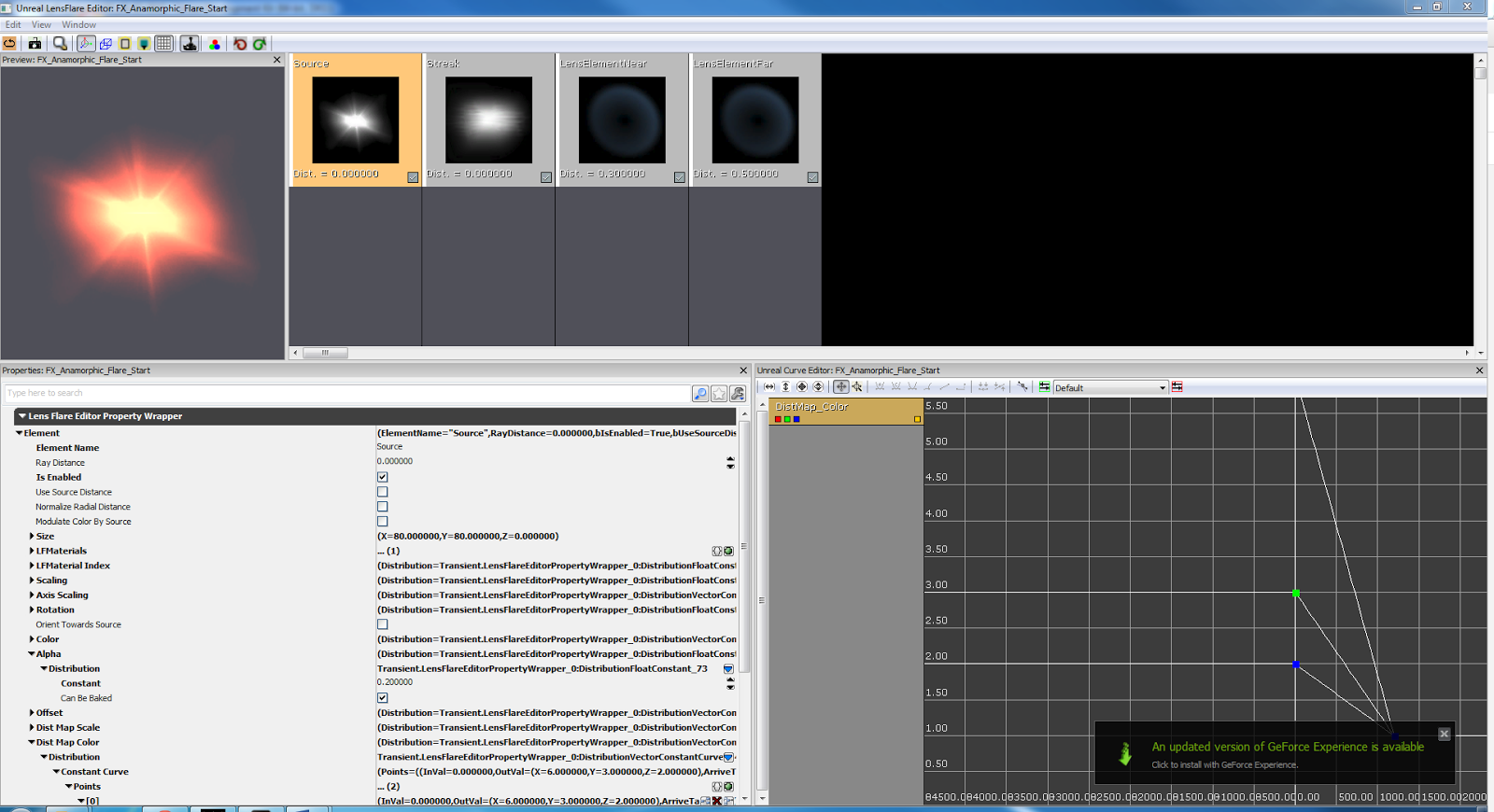
I was given an example lens flare, with multiple components to understand and modify in accordance with my level. I began by locating the lens flare within the content browser and opening properties, giving me access to editable features, this presented me with the following window.


This provides me with multiple customisable elements, which I can edit to achieve multiple different effects, the 4 main editable elements within the lens flare are:
  • Render distance - The distance at which a lens flare will begin rendering on screen and the distance at which it will stop.
  • Flare colour - The physical colour of the flare itself , editable for each of the elements within the flare.
  • Flare size - The size of each respective element of the flare, allowing me to make certain elements within the flare appear larger or smaller.
  • Flare brightness - This allows me to control the brightness of the flare, ranging in distances far from, and near to the emissive object within my level.
I can turn each layer of my lens flare particle on or off individually using the "Is Enabled" tick box, allowing for easier viewing and editing of other sections.

Considering the intended use for the lens flare, I was to edit the colour and size or each element first, the colours were edited to a darker, orange tone in accordance with use on the light itself.


Once I was happy with the size and colour of the flare itself, I began to implement new assets for certain parts of the flare, the near and far lens elements more specifically, I imported the new elements into the flare simply, using the content browser and material editor.
Following the import, the colour and alpha values of the lens elements were edited to give a less harsh result on screen and in-game, the Flare editor and end result can be seen below.


For the moment I am happy with my lens flare, it will likely need tweaking at a further point in development and  I may yet add another lens flare in through further work on this project. As I adapt it to contain a window with a light outside, being in a night time setting I feel a lense flare from either a somewhat harsh light outside or the moon would be appropriate.

Multiplayer Map Design - Animating Materials

Since the end of Unit 70, and finishing up my basic thematic lighting, I have been tasked with implementing 3 different instances of animated light sources into my map. I have been shown examples of animated lighting, including flickering lights and animated 'sprite sheet' style lighting.

Mandatory:

Flickering Lights:

The use of flickering lights I feel will best suit my level, being set in an abandoned warehouse type building in a post war environment, there is room to add a feeling of faulty electrics within the building.
The flickering lights may be used to mark certain pickups or bonuses, for example the rocket launcher within my level which players must fight over, could have a flickering light above, drawing in players to maintain fast game progression.

Post Processing Volumes:

I have a plan for a post processing volume within my level, to be implemented simply covering the upper tier of my map, this will have a darker colour lookup table to dim the light in the upper tier, giving the effect that there is less light higher up, the users on the lower tier of the map will not be affected by the change and will still be able to easily see enemies on the walkways above.

Lens Flares:

I must add a lens flare to my level, providing another source of animated light, these consist of four parts, with the values edited to render at set distances from the player, a lens flare will be added to my level and will be set accordingly with its surroundings.

Optional:

Flipbook Textures:

Flipbook textures are an optional extra to be added into my level if I feel they will fit, at this moment in time I do not see a direct use for a flipbook texture, but this may change, if so one will be subsequently imported into my level.

Thursday, 5 February 2015

Multiplayer Map Design - Lighting

The overall theme of my DM map is to be a previously disused warehouse surrounding, which has been converted into a post-war combat training facility, for this I researched warehouse lighting setups following the block out procedure.


I then took an aerial screenshot of my map, facing straight down in a bird's eye view. I created a simple black and white version of the top down image and put together the mood board containing the more specific lighting information, displaying lighting of different elements of the map.


Following the creation of these mood boards I transferred my information into UDK. I put a roof on my playable area and began laying out the lighting using point light actors in-engine. This was to communicate and relay the information shown in the second mood board into the engine itself.

Once lit, my map looked like this;


From this point I was able to work with neutral coloured lighting, lighting the regions of the map one by one, to be tested at intervals with preview lighting, my eventual result can be seen below.
I feel the doors, entrances to the higher level, pickups and target areas have been lit up efficiently, without the use of too many light nodes and using effective brightness in accordance with my original concept for my deathmatch map.


On 29/01/15 another peer review stage was reached, through this I was to gain feedback on my lighting. I asked three questions and had various peers answer different questions each.

My questions and their respective answers were as follows;


Q1. Can the player navigate the map with ease using the lighting, making use of all lit elements (Doors, Pickups, Upper level access etc.)? Whether yes or no, how could this be improved for an optimal end-user experience.


Answer - The lighting is well lit and by the lightmass/radius I could automatically tell it was set inside a warehouse. The guidance for pickups, etc. was clear, maybe add more lights into certain areas that are darker?


Q2. Are the interactive elements within the map lit well enough to navigate on a regular basis, without having to think about where you are going on the map? Whether yes or no, how could this be improved for an optimal end-user experience.


Answer A -The lighting is excellent and requires very little improvement. The lighting navigation is very clear through the whole level.


Answer B - Loving the placement of the lighting on the doors, not sure how you could improve it. 

Question 3. Do you feel the map as a whole is lit enough, encompassing both upper and lower tiers, or is it too bright or too dim? How can this be altered for the best in-game experience?


Answer - The map as a whole is very well lit guiding the player through what appears to be a maze like level on the first floor, In my opinion I’d say make the lower level a little dimmer so it’s harder to navigate.


Looking at my feedback I took on board both positive and negative points made, and worked on my lighting more to fit the feedback.

As according to the feedback given for question 1 ("Maybe add more lights into certain areas that are darker?") I lit some more areas. The entrances to the upper tier of my map were lacking emphasised light of their own so I added these in, I lit both corridors dividing rooms and also the corridors to the side of the target areas so that users know that both the east and west sided rooms can be accessed from both entrances/exits. This provides navigational lighting and also helps with enemy presentation, as any AI or player coming around the corner or out of one of the main corridors will be lit sufficiently enough to be seen by any other user, with a firefight ensuing.
I have still left some areas darker however, these are left darker for spawning reasons as they are in closed areas and contain player start nodes, and lighting the area may have a negative effect on possible spawn-killing patterns. If this does not appear to introduce problems as such through testing, I will be lighting the areas in question also.


In accordance with the answer given to question 3 ("Make the lower level a little dimmer so it’s harder to navigate.") I have since lowered the brightness of all lights in the level. Some lights were at brightness values as high as 4 and 6 in comparison to the drop to around 0.50-0.75 per light.

I have not lowered the lights any further as of yet as I feel the happy with the dimness of the overall level at this stage and that taking away more light may impact the end-user experience negatively, I don't want the map to be too hard to navigate as this could be detrimental to players using certain portions of my map.

These changes can be seen comparatively between both the below screen captures.


I will continue to edit the lighting as appropriate through both this process and further stages of development as it can undoubtedly yet be improved, particularly within aesthetics and visual touches yet to be added to the map, this may include another overall drop in brightness. However at this moment in time I am happy with the lighting scheme I have and am satisfied that I have lit my level appropriately with regards the layout and have built appropriately on feedback that I have been given by my peers.

Sunday, 7 December 2014

Updates - 07/12/2014

Today I have been adding in path nodes and player starts in an effort to make AI bots utilise all areas of the map, I have also modified the doors to open horizontally.
I have inserted the 16 player starts into my map appropriately spaced and positioned far enough apart to make sure deaths are not too frequent but not infrequent either, improving the pacing of a regular deathmatch. This may not yet be perfect and I will continue working on the pacing until it is appropriate with not just bots but human users also. The player starts in turn require more Path Nodes to be inserted.
Having modified the door to open horizontally, I feel it will improve both pacing and bring the chance of exploitation of choke points down, stopping people hiding behind doors even more so than previously.

I have now successfully integrated the use of doors with regards the AI. I originally had issues caused by the breaking of the link between path nodes when meshes were placed in between them acting as the door mover.
To rectify this issue, I modified three things, the mesh location, animation and the trigger, the meshes now start apart and upon the map loading, animate to come together. This allows me to link two path nodes through the open door in the editor viewport, making sure the line between nodes is green signalling an active link.
After the link was made the meshes were animated and linked to the 'level loaded' trigger, a touch trigger was added, when touched, the animation is set to reverse which opens the doors, and when untouched the animation will play again, closing the doors afterward.


Saturday, 6 December 2014

Multiplayer Map Design - Overview 1

Through development of my multiplayer map to my current point, I have learned multiple new processes and tools to aid me in map creation and have a prototype multiplayer map functioning for play in both Deathmatch and Team Deathmatch.

I have constructed a two-tier map, consisting of 3 rooms and a set of corridors with a walkway above, the rooms containing various pickups and the walkway giving access to a rocket launcher.

Through peer feedback I have noticed some issues with waypointing, notably AI ignoring certain path nodes and in one case an AI attempting to scale a non-scalable mesh repeatedly, rendering them useless to the game mode, providing less than desirable competition from any difficulty AI.

I have taken into consideration many features of a standard multiplayer map and will continue to develop my map taking inspiration from already existent multiplayer maps and building my knowledge as applicable.

Things I still need to consider:

  • I need to fit in more player starts, the standard number for a DM map is 16 as to vary the spawn locations of all users upon death, this will require shifting some nodes and/or player starts, taking into account positioning of spawns to decrease the likelihood of 'spawn-killing'.
  • I have experimented with teleports in my level, but have not yet finalised implementation in the map, as I feel there is currently no use for them, the map is fairly small and can be navigated within a short time frame, I feel as though a teleporter would simply loop the paths which users would take, slowing down pacing and more importantly breaking the architectural flow.
  • I am looking to include some jump pads in my map to make the upper level more accessible, this could also possibly assist me in the fixing of some AI based issues I am currently facing although I would like to fix these without using extra nodes where possible.
  • I will continue to look at peer reviews and analyse them throughout development, I will change my map as appropriate and the gameplay will adapt to the new map and scripting as a result.


Multiplayer Map Design - Jump Pads

Originally I wasn't planning on utilising jump pads within my level, as I thought the ramps in each corner would be navigated by bots in order for them to gain the Rocket Launcher atop my map, this however has turned out differently due to AI constraints and I am most likely going to be implementing jump pads again, giving AI the ability to access the rocket launcher faster and possibly creating firefights on the upper level of my map, between AI or players using jump pads and AI or players navigating using the ramps.


I am aware this may render the ramps almost useless to AI, as they may only select the quicker route to the rocket launcher, this will be taken into consideration as the jump pads are implemented to keep as many concept ideas in place, meaning less or more jump pads may be used.

Intended changes will be documented on action at a later date.

Multiplayer Map Design - Choke Points & Pacing

Throughout the blockout process I have paid attention to choke points and pacing, attempting to keep the pace of the game as fast as necessary, keeping a player on their toes and not letting them sit in one space too long without getting either pressured into moving by suppressive fire or killed by an AI.
This in turn encompasses choke points, in the layout of the map I have incorporated animated cover objects which I am hoping will lessen the effect of players hiding around the corner waiting for people to come past them, instead causing firefights in the corridors with the cover objects providing both advantages and disadvantages, allowing players to both take cover and escape under cover if on low health.
I have also animated my doors to open quite quickly in comparison to a regular door opening speed, this does however fit in with my overall concept and is designed to stop players from sitting behind a door whilst it slowly opens, waiting for the other user on the other side to be revealed and easily shot in the legs/torso as the door rises and the opposing player is unable to see who is shooting at them.


These may yet change, but I am aiming to keep the gameplay and pacing as fluid as possible and feel that with quick door animations and moving cover it helps me to keep the pacing feeling right, this again will only come full circle when I get a larger number of peers on my map at one time with or without AI bots, I will be more able to fully analyse it then.

Multiplayer Map Design - Animated Cover

In the starting blockout process of my map, I considered how a firefight in a corridor could be improved, I then implemented cover objects within my map, made of a basic T shape, identical to that of a Tetris block but with one difference, the single piece on top was to be animated, it would slide along the lower row of three blocks infinitely back and forth throughout the game.
This would allow users to both take cover and return fire, and escape a firefight if necessary utilising cover, to take another route and engage in the firefight from another perspective is necessary.
The design can also be scaled by a user, using as double jump to get over the lower layer of the cover, this can also speed up a firefight as a player can make use of the cover, then scale it, putting an opposing player under pressure.
With the animation in mind the top piece was moved from the centre to one side to aid the animation process.


I have also modelled a rough 3D mesh which may take its place further in the development cycle, the texturing is still subject to change but will be weathered to fit in with the theme regardless, it may also be destructible, though that may prove negative, taking away the cover aspect in corridors, it will definitely be split into two separate meshes so that I can animate the wooden portion to move side to side.


They were animated using the exact same procedure as an elevator, only triggered with an event instead of when mounted, the event chosen was "level loaded". When given the event node in Kismet I linked the 'loaded and visible' option to the start of the animation and selected the loop option, forcing the animation to loop and play infinitely as imagined.


This has had a good effect on AI gameplay so far but due to the pathing 'line of sight' system I will only see how this feature truly works when I have a full team of my peers in control, as players are vastly different to AI controllers.
Any updates on animation or changes in design will be documented upon action at a later date.

Multiplayer Map Design - Volumes

I have been experimenting with implementation of various types of volumes, including trigger volumes and water volumes within my map, cutting away pieces of floor using the brushes and adding in surface actors to show water or other such fluids like slime or lava.


Within my concept I'm not too sure to whether or not fluid volumes will be suitable to the theme of the level and will be experimenting some more to see what I can produce which may fit the level.

I have also been experimenting with some post processing volumes which can be seen when the second water volume is entered in the video below, making use of motion blur, the options available to me within post processing volumes will likely be modified at points in the future.


I am still yet to possibly design another floor to the map, contemplating a lower, underground level to again expand the playable area, whilst keeping the map size at a format which isn't too open or vast. Some water volumes and other volumes may be implemented in either the existing levels or an underground portion, any changes to volumes will be detailed in a later post.

Multiplayer Map Design - Peer Review stage 2

I have performed a second review session with my peers to gain feedback on my DM map, my questions asked and feedback provided was as follows.

Peer Review 2 questions to be answered:

Q1. How do you feel the layout of the map itself affects gameplay? Suggest ways to make it better.

Q2. Do you feel the waypointing and placement of path nodes is true to the architecture of flow, sticking to a figure of eight? Even if yes, suggest ways to improve the waypointing.

Q3. Do you feel the placement of weapons and other pickups like ammo, armor and jump boots helps assist users in navigating the map, bearing in mind the architecture of flow once again.


Peer 1 answers:

1. The layout of the map works well, the bots seem well spread out and interact well with doors, pathways and pickups. To improve your map I would say maybe place hazards such as slime or lava volumes on both sides of the map were the ramps are, or at least a water volume to slow down the players with perhaps a pickup in the centre. (Just adds another aspect, keeps the player interested)

2. The layout and way pointing is spot on really, there's not much room for improvement. My only suggestion would be make the second level more accessible for bots and other players, whilst playing I found that the bots remained on the ground floor, very rarely would they venture up and even then when they saw someone below they would jump off instantly. You should maybe place jump pads to help with this.

3.The weapon, ammo, health pickups work well within your map, the jump boots especially helped me navigate up towards the higher levels and I found health easily when I was low. I would maybe place something inside the areas boxed off by the one block high walls in two of the four corners, place maybe two towers leading to vantage points one or two levels higher up? 


Peer 2 answers:

1. Easy to navigate due to the amount of space in the map. Door are not easy to identify in combat however while not in combat they are easy to identify.

2. Generally most of the path nodes are working apart from one of the corners of the map with a ramp.

3. Pickups help in navigation however I feel like the jump boots have to many uses per pickup. Weapons are placed well around the map creating firefights to get to some of them adding to the flow.


Outcome:
Building on the information given by my peers I will be making modifications to my map in the coming days including alterations to my path nodes and waypointing, door animations and AI usage will also be looked into, as the AI's door usage is reliant on path nodes being altered.
I have found issues myself on top of any highlighted by my peers, and will continue to work on these also to provide a more fluid experience for all users.

Multiplayer Map Design - Doors

Implementing doors into a DM map is much similar to implementing elevators, as they are animated in the exact same way with one difference, a trigger volume used to animate the door.
The process starts again with conversion of a mesh into a mover and the re-application of collision values, followed by the opening if Kismet and the customisation of the animation values, length, start and end keyframes.

The differences in animation come in after the keyframes have been set and the animation completed, the Max Trigger Count, found within the node attached to each matinee, must be set to 0, this orders the animation to run infinitely when triggered, so the door opens every time the trigger volume is activated.
The second difference are trigger nodes themselves, created using the builder brush and assigned in the volume drop down menu, they appear in the viewport as a different coloured cube, trigger volumes show as green.


I have implemented multiple fully functional doors in my DM map used to access rooms and aid navigation. As of right now they open directly upward but I may yet change these to open horizontally, opening from the middle. The reason for the proposed change is that when opening vertically, the doors interfere somewhat with the geometry above, initially cutting through the walkways above the lower level, the walkway was reshaped to cut around these, however the idea to animate a double door sliding open horizontally is now a much more attractive prospect.
This change will be detailed at a later date.


Wednesday, 3 December 2014

Multiplayer Map Design - Elevators

Today I began basic animation techniques within my deathmatch map, looking at both lifts and doors, starting with elevators, I converted a chosen mesh to a mover, making sure it could be mounted with ease in-game and re-applied the collision values ready for animation.
Kismet was then opened and a 'New Interp Actor' chosen, this granted me access to UDK Matinee and with that the ability to animate the mesh. I created two keyframes, one at the beginning and one at the end of the animation window and at the meshes end point, moved it to where I wanted the animation to finish and then return, the matinee window was then closed and the elevator tested.


I have experimented with adding a lift into my level, although due to the use of multiple tiers and constraints with the AI I am not yet set on including them within my level. the AI will sometimes not use lifts unless forced to, and as such would not be able to access the upper tier of my map which contains a single rocket launcher for use against opponents, due to the positioning and distance away from the potential lifts in opposing corners the AI is unlikely to use one.
This may change throughout the developmental process, with the implementation of more user controlled characters and less AI present. The addition of extra users will alter the gameplay experience for all involved, with characters wanting to use lifts to access the rocket launcher on the walkways above.


Multiplayer Map Design - Path nodes & spawn locations.

Following the first batch of peer review feedback, I was happy with the base look of my deathmatch map, this then is where the basic AI implementation begins in the form of 'player starts' and 'path nodes'.
Player Starts are in-game spawn points which AI characters and end users will access and respawn on every time they are killed in-game and are found located in various places around any map. These are shown as joysticks within the viewport.


Following placement of a player start in the viewport, player nodes are added then duplicated [Using Alt + Move], in the pathing process player start points, pickups and navigational aids all act as nodes to lessen the amount of nodes necessary, even if only by a few, marginally bringing down the file size and shortening the load times of a map for an end user.
I have implemented many path nodes and pickups within my map and the result so far can be seen below.


There is still a lot of experimental work to be done in terms of pathing, due to interaction issues with animated software, some corridors must also be widened if possible, as the AI will ignore certain coloured path lines, I am hoping to fix these with addition or altering of path nodes and possible pickup placement, however I will also have to take into account the architectural flow of the map at the same time, so the map stays true to the figure of eight, whilst becoming fully functional with no AI issues.